Power BI Navigator
AI-Powered Report Assistant for Power BI
What is Power BI Navigator?
Power BI Navigator transforms how users interact with Power BI by combining embedded reports with an intelligent chat assistant. Instead of clicking through complex dashboards, users simply ask questions in plain English and the AI navigates reports, applies filters, and executes queries on their behalf.
Built on the GuideAnts platform, Power BI Navigator gives your AI assistant complete knowledge of your workspace - all reports, pages, visuals, slicers, and bookmarks - enabling truly intelligent data exploration.
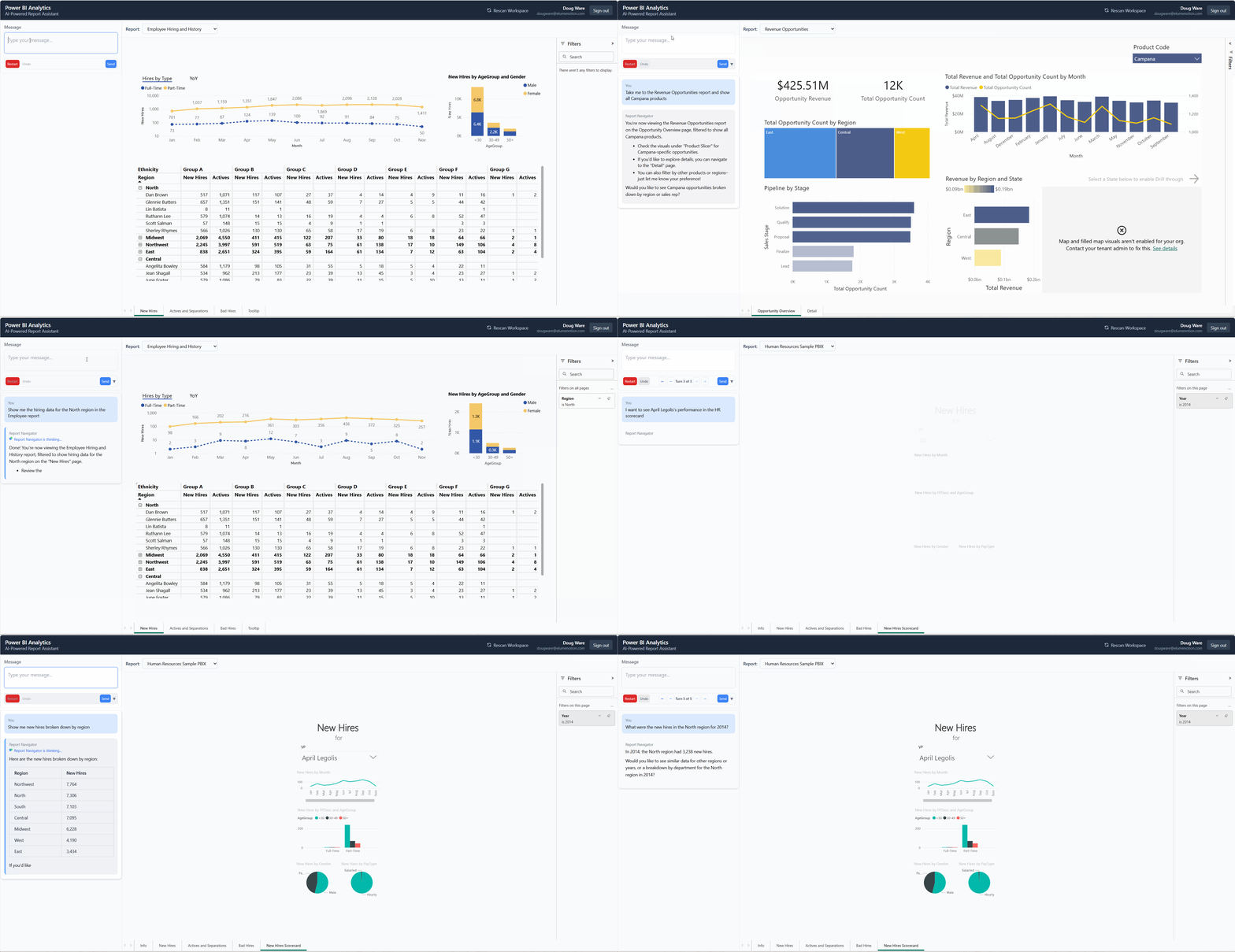
Ask questions naturally and watch as the AI navigates your reports, applies filters, and retrieves data.
The Problem
Power BI dashboards are powerful but complex. Users struggle with:
- Navigation overload - Multiple reports with dozens of pages and visuals
- Filter complexity - Finding the right slicers and filter combinations
- Training burden - Teaching every user how to navigate your BI environment
- Ad-hoc questions - Answering "How many new hires last quarter?" requires manual exploration
Power BI Navigator eliminates these barriers.
Key Features
Natural Language Navigation
- Switch reports - "Open the Sales Dashboard"
- Navigate pages - "Show me the Details page"
- Apply filters - "Filter to North region"
- Set slicers - "Show Dan Brown's data"
Intelligent Context
- Full workspace awareness - Knows all reports, pages, and visuals
- Live state tracking - Understands current filters and selections
- Smart suggestions - Recommends valid filter values
- Error recovery - Handles invalid inputs gracefully
Data Queries
- DAX execution - Answer ad-hoc questions with real data
- Aggregations - "How many new hires this year?"
- Filtered queries - "Total revenue for Product X"
- Grouped results - Data summaries on demand
Enterprise Ready
- Azure AD integration - Users authenticate with org credentials
- Permission-aware - Users see only their authorized reports
- Token management - Automatic refresh, no interruptions
- Secure API handling - Keys managed server-side
How It Works
- Authenticate - Users sign in with Azure AD credentials
- Inspect - Background process captures complete workspace metadata
- Chat - Users ask questions in natural language
- Act - AI guide executes actions: navigation, filtering, queries
- Respond - Results displayed in report view and chat
Available Tools
| Tool | Purpose | Example |
|---|---|---|
SelectReport | Switch between reports | "Open Sales Dashboard" |
NavigateToPage | Go to specific page | "Show the Detail page" |
SetFilter | Apply data filters | "Filter to North region" |
ClearFilters | Remove filters | "Clear all filters" |
SetSlicerValue | Set slicer selections | "Select Q1 2024" |
ClearSlicer | Reset slicer | "Reset the date filter" |
QueryData | Execute DAX queries | "How many active employees?" |
Technology Stack
Frontend
- React 18 + TypeScript
- Tailwind CSS
- Power BI Client SDK
- GuideAnts Chat Component
- MSAL.js (Azure AD)
Backend
- .NET 8
- ASP.NET Core Minimal APIs
- GuideAnts Proxy Middleware
Services
- Azure Active Directory
- Power BI Embedded
- GuideAnts API
Use Cases
- Executive Dashboards - Executives ask questions without learning Power BI
- Self-Service Analytics - Business users explore data independently
- Customer-Facing Reports - Embed guided analytics in customer portals
- Training Reduction - New users get value immediately
- Ad-Hoc Reporting - Answer questions without building new reports
Get Started
Power BI Navigator is available for enterprise deployment. Contact us to discuss your Power BI analytics needs.
Email: contact@elumenotion.com