Is MCP Really Necessary? Why “APIs Are Hard” Is Overstated and MCP Is Oversold
The sales pitch around Model Context Protocol (MCP) usually starts with a familiar complaint: APIs are too hard, too messy, too fragmented. The official MCP documentation leans into this story, emphasizing “standardization” through unified interfaces and protocols, promising “efficiency” via optimized context management, and highlighting “ease of use” with simple, intuitive APIs and a low barrier to entry. MCP Docs
OpenAI’s Agents SDK doubles down with the “USB‑C for AI” analogy. In that framing, “MCP is an open protocol that standardizes how applications provide context to LLMs. Think of MCP like a USB‑C port for AI applications. Just as USB‑C provides a standardized way to connect your devices to various peripherals and accessories, MCP provides a standardized way to connect AI models to different data sources and tools.” OpenAI Agents SDK (MCP)
The implied premise is straightforward: direct API integration is so painful that you should prefer going through MCP whenever possible.
APIs as City Streets, MCP as Highways
A useful way to think about this is roads.
APIs are like roads. When MCP marketing talks about “APIs are hard,” it’s implicitly comparing itself to the worst dirt roads and pothole‑ridden alleys, then claiming it’s the only way to drive safely.
But most modern REST APIs aren’t like that at all. They’re more like well‑paved city streets: clear lane markings, sensible signs, predictable intersections. You can drive on them just fine, especially if you have a good map.
Legacy or undocumented systems are the exceptions. Those are the occasional dirt roads at the edge of town. They’re rougher, and you might need a map and some careful observation (developer tools plus an LLM) to figure out where they go, but you can still drive on them.

MCP, in this metaphor, is more like a standardized highway interchange system. It becomes valuable when you’re coordinating a lot of traffic between many different cities, and you want consistent on‑ramps, off‑ramps, and signage across a whole region.
The key point is that you don’t need a highway to drive across town. For many teams, the paved city streets they already have (their existing REST APIs, plus a bit of LLM help) are more than enough. Highways and interchanges are useful infrastructure at scale, but they don’t suddenly make ordinary streets “too hard” to use.
As a general claim, that doesn’t hold up.
Are APIs Really So Hard That You Need MCP?
If you listened only to MCP marketing, you might come away believing that working directly with APIs is a slog of glue code, inconsistent conventions, and integration hell. In reality, a large fraction of modern APIs are already straightforward to use (especially when you have a capable language model helping you).
Consider a very ordinary task: integrating a single, well‑documented REST endpoint. I recently asked an LLM agent to read the Brave Images Search API documentation and generate an OpenAPI schema for the /res/v1/images/search endpoint. Brave Images Search API Docs The interaction was almost comically simple. I pointed it to the documentation page and asked it to create an OpenAPI schema in JSON format. I told it not to use components. Then I asked it to simplify the request and response schemas, removing any properties that weren’t necessary to find and display images.
After a couple of iterations, I had a minimal schema. The request consisted of a query string, a count, and a safesearch flag. The response was an array of results, each with a URL, a thumbnail, and a title. That was enough to build a working, agent‑friendly tool that could find images and show them in a UI. There was no elaborate glue code, no “integration hell,” and no special framework. The API itself was clean: a single base URL, a single endpoint, one auth header, straightforward parameters, and JSON responses. The language model did the grunt work of turning prose documentation into a machine‑readable schema; I merely nudged it to match my preferences.
This Brave example is not a cherry‑picked miracle. A large fraction of modern APIs already look like this. They follow reasonable REST conventions, use simple authentication schemes such as API keys or bearer tokens, define clear parameters, and provide concrete examples. They speak JSON, often with an OpenAPI specification available or trivial to infer from the docs.
If your starting point is a halfway decent REST API plus an LLM, the idea that you need MCP just to make integration tractable becomes very weak. MCP may still be useful in some contexts (large organizations with many systems and strong governance concerns, for example) but the baseline claim that “APIs are too hard” is simply not true in many real‑world cases. MCP proponents often compare themselves to the worst APIs and the worst integration practices, then claim victory. When you compare MCP to competent use of existing APIs combined with LLM‑assisted schema generation, the value gap shrinks dramatically.
What Happens When There Are No API Docs (Do You Need MCP Then?)
At this point, someone usually raises a fair objection. The Brave example worked because the documentation was good. What about internal or legacy systems with no documentation at all? Isn’t that where MCP really shines?
Even then, you often don’t need formal API docs (or MCP).
Modern browser developer tools give you direct access to the real API traffic your application is already sending. For many internal features, that traffic is more reliable than whatever half‑written wiki page might exist. You can picture the process as a flow from a human using a feature in the browser to an agent calling a tailored API schema.
Here is the flow, visualized:
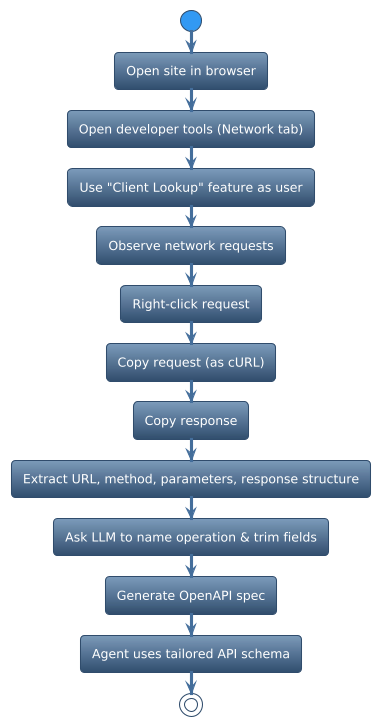
Flow: from using a feature in the browser to an agent using a tailored API schema.
You begin by opening the application in a browser and navigating to the feature you care about, perhaps a “Client Lookup” screen in a support tool. You open the browser’s developer tools and switch to the Network tab so you can observe HTTP traffic. Then you use the feature exactly as a normal user would: you type a client name, press search, and click through the results.
As you do this, you watch the requests that appear in the Network tab. Somewhere in that stream of calls, you will see a request that looks suspiciously like the client search you just performed, something like GET /api/clients?query=alice or POST /api/clients/search. Once you’ve identified the relevant request, you right‑click it. Modern browsers let you copy the request as cURL or in a similar format, capturing the exact HTTP call your application is making, including headers, URL, method, and parameters.
Next, you click the same entry and look at the Response pane, where you can see the JSON payload the server returned. You copy that response as well. At this point, you have two critical artifacts: a concrete request and a concrete response.
From these, either you or an LLM can extract the URL and HTTP method, identify the query string or body parameters, and infer the structure of the JSON response, including the key fields and how they nest. You can feed that request and response into an LLM and ask it to propose a clear, domain‑specific operation name. Instead of a generic searchClients, you might ask it to suggest something like searchClientsForSupportAgent. You can tell it to keep only the fields your agent actually needs (perhaps an ID, a name, an email address, and a status) and to ignore everything else. You can also ask it to suggest sensible defaults or constraints, such as a maximum number of results or a default sort order.
Once the model understands the shape of the request and response and the intent behind the operation, you ask it to emit a minimal OpenAPI schema that reflects this operation. The result is a small, tailored spec that describes exactly the “Client Lookup” behavior you care about, with a name and surface area that make sense for your agent. From the agent’s perspective, it now has a clean, well‑named, tightly scoped API for client search, even though no official documentation ever existed.
The important point is that even in the “no docs” scenario, the combination of browser developer tools, captured traffic, and an LLM makes describing an API almost trivial. You don’t need MCP. You don’t need a vendor‑maintained spec. You don’t need to wait for anyone to wrap the system. If the basic value premise is that APIs are hard to understand and describe, this workflow directly contradicts it. For many real applications, the friction is low enough that an MCP layer is a nice‑to‑have infrastructure choice, not a fundamental requirement.
What Are the Downsides of MCP for Cost and Quality?
So far, we’ve focused on why MCP is often unnecessary. There are also real downsides, especially if your goal is to lower cost and improve quality with tool‑based agents.
These downsides become clearer when you compare MCP’s default usage patterns to the kind of architecture described in “How to Lower Cost and Improve Quality with Tool‑Based Agents,” which relies on narrow, task‑specific tools, early filtering, and specialized worker agents. How to Lower Cost and Improve Quality with Tool‑Based Agents
Does MCP Encourage Overly Broad Tool Surfaces?
MCP makes it easy to expose a large catalog of tools from a server. That convenience comes with a risk: it becomes equally easy to expose too much.
In practice, tools from different MCP servers tend to use generic operation names like search, list, get, and create. Their descriptions are often vague or overlapping, promising to “search for items,” “retrieve records,” or “list resources” without clearly stating which domain they belong to or how they differ from one another. Their parameters are technically valid but semantically unclear. To a language model, this is not a neat toolbox; it is a junk drawer.
In a tool‑based architecture focused on cost and quality, the tools look very different. They are narrowly defined, named in domain‑specific terms, and designed as clear contracts for the agent. That tight surface area is a key lever for both cost and reliability. When MCP lowers the friction to exposing big, generic tool surfaces, it quietly increases token usage, confusion, and the risk of misuse. The more overlapping operations you show the model, the more ways it has to be slightly wrong.
Does MCP Make It Too Easy to Send Raw Data into the Model?
MCP’s default pattern is simple: the model calls a tool, and the tool returns a raw response directly to the model. There is no built‑in concept of filtering or compressing the data before it hits the main context. MCP Docs
In the tool‑based agents pattern, the architecture is deliberately different. Noisy work (like crawling and reading web pages) happens in specialized sub‑agents. Each sub‑agent sees a small, focused context, often just one page and the user’s query. Those sub‑agents can respond with “NOT FOUND” when nothing relevant appears, discarding irrelevant content early. Only filtered, relevant snippets ever reach the main agent. How to Lower Cost and Improve Quality with Tool‑Based Agents
This early filtering and context isolation is what keeps token usage low and answer quality high. With MCP, it is easy to fall into a lazier pattern: call a search tool, get back a large result set, and pass it all to the model; call a “read” tool, get back full documents, and dump them into context; let the main agent do all the filtering and extraction. The downside is straightforward: more tokens, more noise, worse answers. MCP does not force you into this pattern, but its convenience at the protocol layer makes it very tempting.
Does MCP Push Complexity into One Big Agent Instead of Specialized Workers?
The default story around MCP and hosted tools is that you have a model, it discovers tools, it calls them directly, and it interprets their responses. The OpenAI Agents SDK documentation describes how “the model lists the remote server’s tools and invokes them without an extra callback to your Python process,” and how “each MCP server supports tool filters so that you can expose only the functions that your agent needs.” OpenAI Agents SDK (MCP)
There is no structural encouragement in that story to split responsibilities between an orchestrator and specialized workers, or to use different models for different tasks.
In a cost‑optimized tool‑based design, you typically do the opposite. You use an orchestrator model for high‑level reasoning and planning, and cheaper, smaller models for extraction, filtering, and classification. You isolate contexts so each worker sees only what it needs. This pattern can significantly reduce cost while improving reliability. How to Lower Cost and Improve Quality with Tool‑Based Agents
MCP doesn’t forbid this architecture, but it doesn’t promote it either. Without deliberate design, teams tend to default to a single large model doing orchestration, extraction, filtering, and synthesis, all in one big context, with direct access to a large set of tools. That increases cost, because you are paying a premium model to do cheap work, and it makes behavior more brittle, because all the complexity is concentrated in one place.
Can MCP Give a False Sense That Tool Design Is “Solved”?
Because MCP standardizes how tools are exposed, discovered, and called, it is easy to assume that “tool design” is largely taken care of. You stand up an MCP server, define some tools, and now your agents can use them. Problem solved (or so it seems).
In reality, all the hard work remains. You still have to decide which tools belong in a given agent’s world, name them in domain‑specific, unambiguous ways, trim their surface area to what the agent actually needs, set defaults and constraints, and write prompts and descriptions that explain when and why to use each tool. MCP does not remove any of that effort. At best, it makes some plumbing more convenient.
The danger is that teams think, “we have MCP, so our tools are agent‑ready,” and under‑invest in the design work that actually drives cost and quality. The result is a system that looks standardized on paper but behaves unpredictably in practice.
Does MCP Really Deliver Composable Tools?
Another major claim around MCP is composability. Because tools all speak the same protocol, the story goes, agents can discover them dynamically and chain them together. The OpenAI Agents SDK documentation explains how hosted MCP tools let the model list a remote server’s tools and invoke them without an extra callback to your Python process, and how each MCP server supports tool filters so that you can expose only the functions your agent needs. OpenAI Agents SDK (MCP) The narrative that emerges is one of a plug‑and‑play ecosystem: tools that “just work together” because they share a protocol.
This sounds great. It is also mostly wishful thinking.
MCP standardizes how tools are called. It does nothing to standardize what they mean. In practice, tools use generic operation names, vague descriptions, and parameters that are technically valid but semantically unclear. To a language model, this is not composability; it is ambiguity.
The fact that everything speaks MCP does not tell the model which search finds images, which search queries CRM contacts, which search digs through logs, or how to chain a list, a get, and an update across different domains. The hard part is not calling a function over a protocol. The hard part is semantic alignment: giving the model a set of tools that are named, scoped, and documented in a way that matches the agent’s job.
A thin, bespoke API description layer gives you exactly that control. Instead of exposing a generic search operation, you rename it to something unambiguous in your agent’s world, such as searchBraveImagesForDisplay, getCrmContactsForEmailCampaign, or lookupProductBySkuForCheckout. These names carry domain intent in a way that “search” never will. You trim the surface area of each tool to what the agent actually needs, set defaults so the model doesn’t have to decide on every detail, and embed assistant‑specific guidance right into the descriptions. You might tell the model to use a particular tool only when the user explicitly asks for images to show in the UI, or to fetch customer records with another tool before drafting an email.
MCP does not prevent you from doing any of this, but it does not do it for you either. The claim that MCP gives you composable tools because they share a protocol ignores the real bottleneck, which is semantics and user experience for the model. Protocol‑level composability is the easy part. Semantic composability is the hard part, and MCP does not solve it.
Does Tool Discovery in MCP Mean the Model Understands the Tools?
A third pillar of the MCP story is discovery. The MCP docs talk about “standardization” and “ease of use,” presenting MCP as a way to “simplify development” and “optimize context management.” MCP Docs The OpenAI Agents SDK shows how hosted MCP tools allow the model to list and call tools from remote servers without custom listing and dispatch logic. OpenAI Agents SDK (MCP)
Again, this sounds nice: the model can “discover” tools and just start using them. But discovery is not understanding.
Discovery gives the model a list of tools, their signatures, and short descriptions. It does not give the model a sense of which tools are appropriate for this agent’s responsibilities, a strategy for choosing between overlapping tools, a plan for sequencing tools in multi‑step workflows, any real notion of business rules or safety constraints, or a concept of when not to call a tool even if it looks superficially relevant.
Without strong system prompts and curated tool surfaces, models with a large discovered toolset behave exactly as you would expect. They overuse some tools and ignore others. They call tools redundantly. They misread vague descriptions and pick the wrong operation.
All of the hard work remains in tool selection, in deciding which tools even belong in this agent’s world; in naming and scoping, in making tools match the domain and the agent’s role; in prompt design, in telling the model when and why to use each tool; and in policy and safety, in enforcing constraints outside the model. MCP does not remove any of that effort. At best, it makes some plumbing more convenient. The idea that discovery plus a protocol is enough to make tools “just work” with agents is optimistic marketing.
So When Is MCP Actually Worth Using?
None of this means MCP has no value. There are real benefits in certain contexts.
MCP can standardize how tools are exposed and called across teams and products, and can centralize some aspects of connectivity, especially when you use hosted MCP tools. MCP Docs OpenAI Agents SDK (MCP) It can provide large organizations with a common substrate for governance, logging, and access control. These are meaningful advantages (but they are infrastructure and governance wins, not magic bullets for “APIs are hard” or “agents can’t use tools”).
If we are honest about the value proposition, it looks different from the USB‑C analogy. USB‑C solved a brutal mess of incompatible connectors. Modern HTTP APIs with JSON and a capable language model are nowhere near that level of chaos.
If your primary goals are to lower cost and improve quality, patterns like orchestrator‑and‑worker agents, narrow, domain‑specific tools, early filtering and context isolation, and using different models for different tasks matter far more than whether you use MCP. Those are the patterns described in “How to Lower Cost and Improve Quality with Tool‑Based Agents,” and they apply whether your tools are exposed via MCP, direct HTTP, or something else entirely. How to Lower Cost and Improve Quality with Tool‑Based Agents
For many teams, the simplest and most effective path remains to use the APIs they already have, to capture real traffic when documentation is missing, to let an LLM help generate a thin, bespoke OpenAPI spec, and to curate a small set of tools with clear prompts that explain how those tools relate to the agent’s job. MCP can be a useful piece of infrastructure, especially at scale. But as a universal answer to “APIs are hard” or “agents can’t use tools,” its case is overstated.