Why “Guides” - from prompts to workflows
Most teams don’t need “a chatbot.” They need guidance to find and use information to perform work using natural text, voice and vision. This distinction matters because it shifts the conversation from “let’s add AI” to “let’s make this workflow reliable.”
This post introduces the core mental model we’ll use throughout the series. Guides are coordinators for getting work done. Assistants are specialized helpers the guide can delegate to. Tools are capabilities like APIs, retrieval, code execution, and integrations. Knowledge and files are sources of truth the workflow can reference. And publishing or embedding turns internal guidance into product experiences.
Why “prompting” isn’t an architecture
Prompts are great for exploration, but they’re fragile as a foundation for applications. When you rely on prompts alone, you run into several problems.
First, there’s the issue of inconsistent outputs. A “pretty good” answer isn’t good enough for a workflow step that ships to customers. You need reliability, not occasional brilliance. Second, when results are wrong, it’s hard to tell which step failed because the process is hidden inside a single prompt. Third, there’s no modularity. The moment you add “and also do X,” you create a mega-prompt that’s difficult to test and maintain. Finally, prompts are hard to operationalize. You need controls around tool access, authentication, limits, retention, and monitoring.
Production applications require guided work, not vibes.
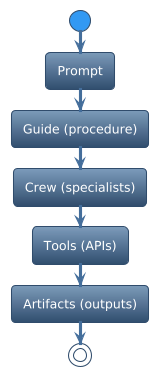
The “Guide” mental model
A Guide is an agent designed like a product feature. It has a purpose, boundaries, and a repeatable operating procedure. This is the core shift in thinking.
When you define a guide, you should be able to answer several questions. What job is it responsible for? What inputs does it require? What tools is it allowed to use? What outputs does it produce, including both format and quality bar? When does it delegate, and to whom? How does it handle failure? How do you measure whether it’s working?
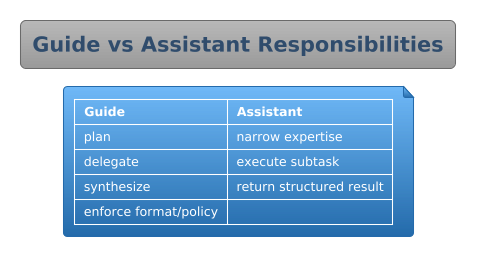
Think of a guide as the orchestrator in a system, not the whole system. It’s the thing that knows what needs to happen and coordinates the pieces to make it happen.
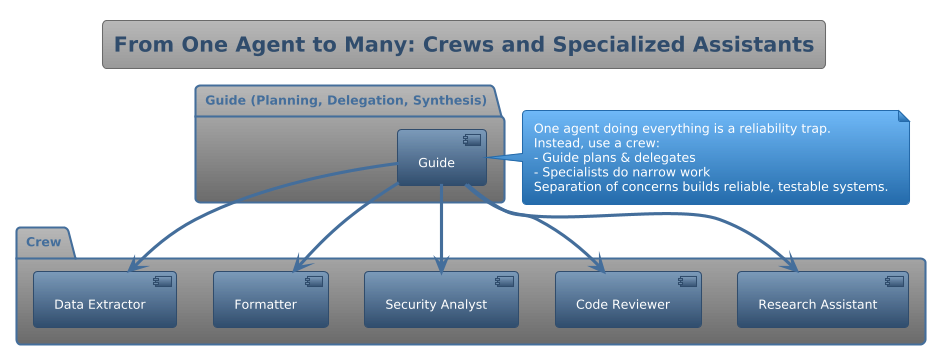
From one agent to many: crews and specialized assistants
In real applications, one agent doing everything is a reliability trap. The more responsibilities you pile onto a single agent, the more likely it is to fail in subtle ways.
Instead, use a crew. The guide stays focused on planning, delegation, and synthesis. Specialized assistants do narrow work like research, code review, security analysis, formatting, and data extraction.
This is the same reason modern software is built from services and modules instead of one giant function. Separation of concerns isn’t just good architecture; it’s how you build systems that can be tested, improved, and trusted.
Tools: when “AI” becomes “software”
Tools are what turn chat into application behavior. Without tools, an AI can only describe what should happen. With tools, it can actually do things.
Tools let you query internal data, create and validate artifacts, run deterministic checks, integrate with third-party systems, and enforce policy about what’s allowed and what’s not. If your AI can’t call a tool, it can’t reliably complete real tasks. It can only describe them.
Extend your AI beyond your team
Guides are used interactively inside notebooks, but publishing is a key value proposition. Treat a guide, along with its crew, tools, and knowledge, as a reusable component you can deploy across many surfaces.
Build and test guides internally, then publish them anywhere. Once defined, these guides can be rendered anywhere via standard web components. For example, the guideants-chat widget allows reuse. But the core idea is broader: your guide becomes a portable capability you can embed into new or existing systems.
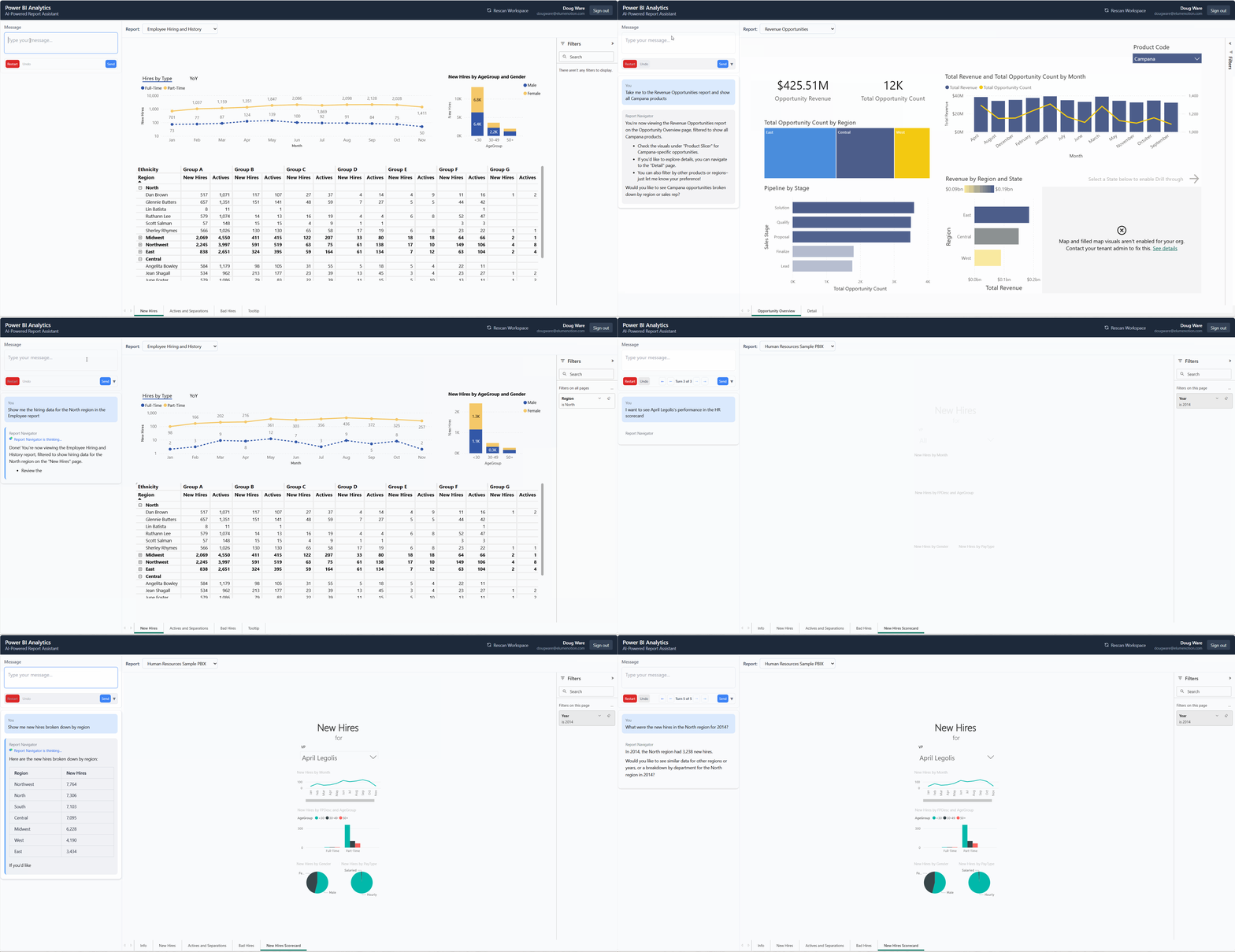
You can embed AI chat widgets directly into your website, customer portal, or internal tools. You can create public-facing assistants for support, documentation, or interactive experiences. You can integrate with your app using client-side tool execution for dynamic, context-aware conversations. And you can maintain control with authentication options, usage limits, and real-time analytics.
A concrete reference stack
Throughout this series, we’ll reference two complementary ways to build guided agent workflows.
GuideAnts is the product and workflow layer. It’s where you author guides, crews, tools, and knowledge, then publish and embed them. You can learn more at GuideAnts.
AntRunner is the code and implementation layer in .NET. It provides tool-based assistants, streaming, external tool calls, and OAuth token forwarding. It’s open source and available at AntRunner on GitHub.
You can use either independently, but together they illustrate the full spectrum from designing agent workflows to implementing them.
What “good” looks like: a guide design checklist
Use this checklist when you turn a prompt into a guide.
- Clear scope: what the guide does and does not do.
- Repeatable procedure: the steps the guide follows every time.
- Structured output: a stable format like headings, tables, or JSON schema, whatever your app needs.
- Tool boundaries: only the tools required, no “tool buffet.”
- Delegation rules: when to call specialized assistants and what each assistant is responsible for.
- Test prompts: five to ten golden test cases that represent real user requests.
- Observability hooks: what you’ll monitor, including cost per run, tool call counts, error patterns, and user success rate.
We’ll expand each of these in upcoming posts.
What’s next
In the next post we’ll build a reusable assistant using Search as an example. You’ll see how to define clear boundaries, structure tool calls, and create something that can be tested independently and composed into larger workflows.
If you’re building an application and want a reliable AI feature, start here. Don’t ask “what prompt should I use?” Ask: what work am I trying to guide and standardize?