Faster, Cheaper, Better: Why Guides and Assistants Beat Single-Model AI
When you ask an AI to do something complex (like creating a podcast, designing a cover image, and producing a video) it’s tempting to throw the entire request at a single model in a single conversation thread. But there’s a smarter, faster, and cheaper way: break the work into guides and assistants, each with its own role, tools, and even its own model.
In this article, we’ll walk through a real example - “Today in History Podcast Video with Python” - to show how modular AI architecture, combined with parallel execution, can deliver high-quality results quickly while keeping costs under control.
What Are Guides and Assistants?
Before diving into the example, let’s define the core concepts:
- Guide → The project manager. Understands the overall goal, breaks it into steps, and delegates tasks to specialized assistants.
- Assistants → Specialists. Each is narrowly focused: searching the web, reading pages, generating media, or executing code.
- Crew → The team inside a guide. A guide can include multiple assistants, each with its own tools and model configuration.
Think of it like a newsroom: The editor-in-chief (guide) assigns reporters (assistants) to cover different angles of a story. Designers and technicians (other assistants) prepare visuals and audio, all coordinated into one final product.
Types of Assistants
Global Assistants are pre-configured by the platform and available to all teams. They include:
- Search (Web Search and Scrape)
- Code Executor
- Read Web
- Media Creator
- Diagrams
- And many more specialized tools
Custom Assistants are created by your team, tailored to your specific needs, with custom tools, files, and instructions. They’re only available to your team and can be reused across multiple guides.
The “Today in History” Project: A Real-World Example
Let’s examine how a guide orchestrated multiple assistants to complete a complex multimedia project. This example was built using GuideAnts Notebooks, an AI-powered workspace that makes it easy to create guides, configure assistants, and build modular workflows like the one shown here.
User request:
“Create a podcast about today in history and a cover image, then combine the two to make a video with sound using Python.”
Guide’s plan:
- Search for historical facts for January 8
- Read and extract relevant details from web pages
- Create a podcast script and record narration
- Design a cover image
- Combine audio and image into a video using Python

Result: Here’s the completed video that was generated by the guide and its crew:
How the Crew Worked Together
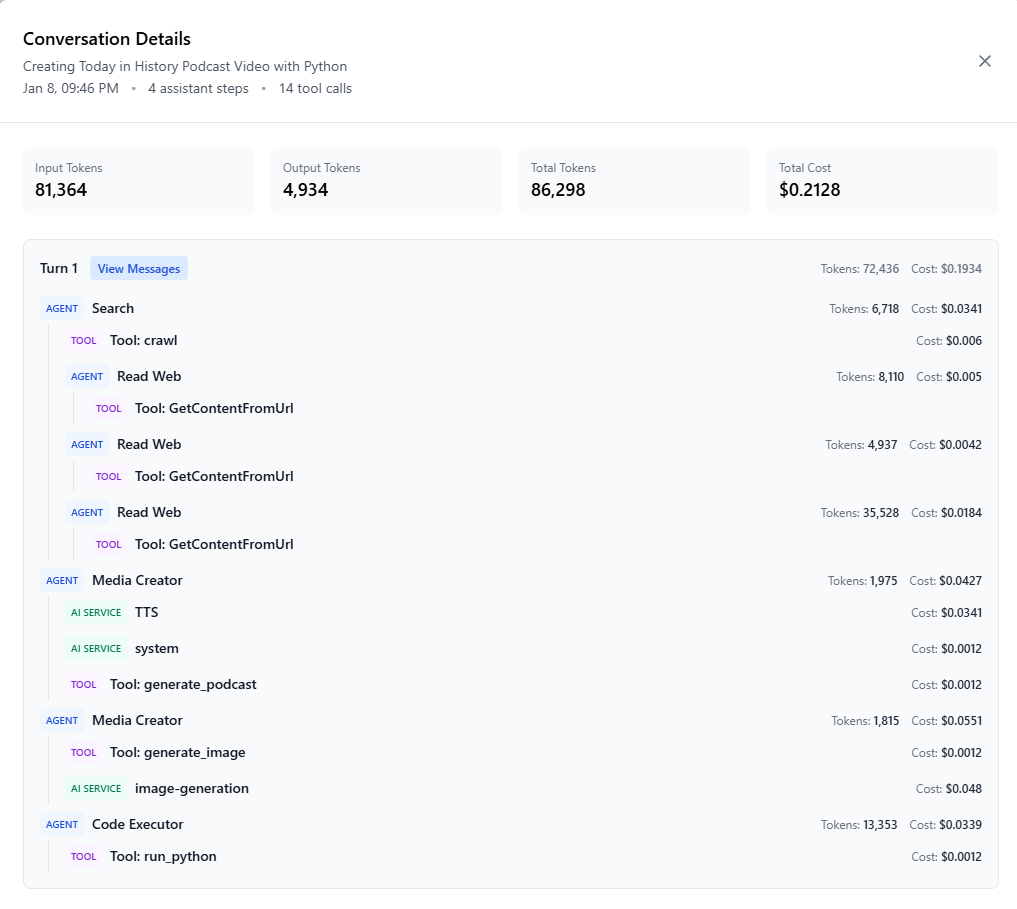
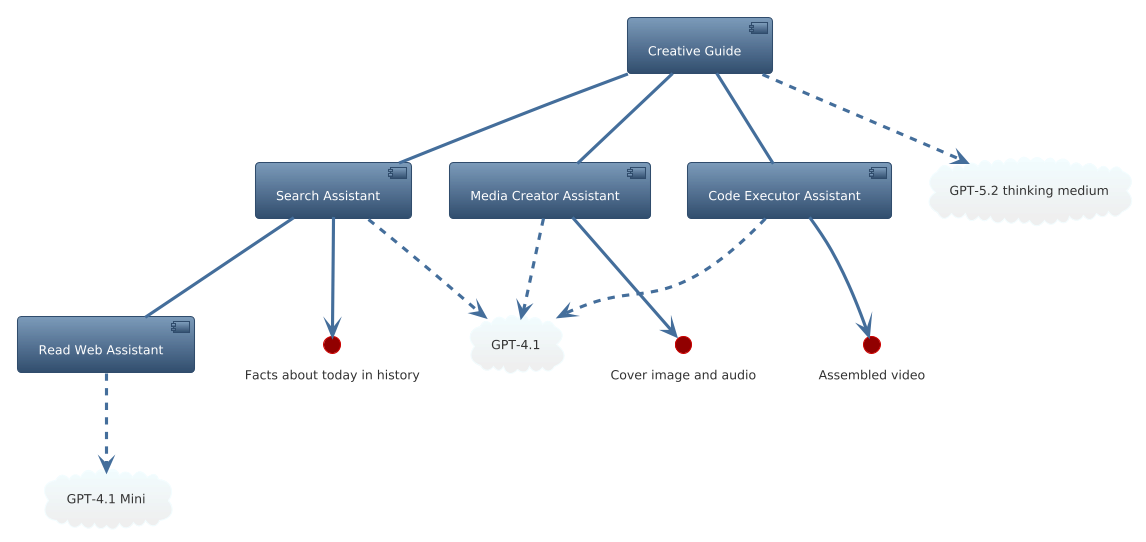
The guide orchestrated four specialized assistants to complete this task:
- Search Assistant (Model: GPT-4.1) - Found “Today in History” events from multiple sources
- Read Web Assistant (Model: GPT-4.1 Mini) - Loaded pages and extracted key facts
- This step consumed 35,528 tokens across multiple page reads, so using a cheaper model saved significant costs
- Media Creator Assistant - Produced podcast audio narration and cover image
- Code Executor Assistant - Combined the audio and image into a final
.mp4video file
Cost Breakdown
From the conversation activity report:
- Total Tokens: 86,298
- Total Cost: $0.2128
- Assistant Steps: 4
- Tool Calls: 14
The heavy web reading tasks (which consumed over 50,000 tokens) were handled by GPT-4.1 Mini, keeping costs low without sacrificing quality for extraction tasks. The guide’s orchestration and creative synthesis used GPT-4.1, ensuring high-quality decision-making where it mattered most.
Quality Through Context Isolation
One of the most significant advantages of the guide + assistants architecture is how it handles conversation context.
The Single-Thread Problem
In a single model, single-thread approach:
- Every step shares the same conversation context
- Large inputs (like full web pages) can bloat the context window, pushing important instructions out
- Raw data from early steps can distract or contaminate later outputs
- The model must juggle multiple task types simultaneously, reducing focus
The Invocation Tree Advantage
In the guide + assistants invocation tree:
- Each assistant runs in its own local context, isolated from other assistants
- The Read Web assistant sees only the page content and extraction instructions - it’s not burdened with the podcast script or Python code steps
- The guide receives clean, distilled summaries instead of noisy raw data
- Each assistant can fully focus on its specialized task without irrelevant context noise
Result: Higher accuracy per step, and the guide’s reasoning stays sharp because it maintains a lean context focused on orchestration and synthesis.
Context Isolation Comparison
| Aspect | Single Model, Linear Context | Guide + Assistants Invocation Tree |
|---|---|---|
| Focus per step | Mixed, all steps share context | Laser-focused per assistant |
| Context size | Can bloat quickly | Lean guide context, isolated assistant contexts |
| Model fit | One-size-fits-all | Task-specific models |
| Noise risk | High (irrelevant tokens persist) | Low (clean outputs passed back) |
| Quality consistency | May drift over long context | Maintained per assistant role |
Cost Efficiency Through Model Specialization
Perhaps the most practical benefit of this architecture is the ability to optimize costs by matching models to tasks.
Strategic Model Assignment
- Token-heavy tasks (like reading multiple web pages) use GPT-4.1 Mini - cheaper, faster, and well-suited for extraction
- High-reasoning tasks (like synthesizing the podcast script) use GPT-5.2 - more capable for complex decision-making
- Creative generation tasks can use models tuned specifically for media output
Beneficial Impacts
In the January 8 project, the Read Web assistant processed over 50,000 tokens across multiple web pages. If this had been done with GPT-4.1 instead of GPT-4.1 Mini, the cost would have been significantly higher. By using the right model for the right job:
- Cost savings: The cheaper model handled high-volume, low-complexity extraction
- Quality preservation: The premium model was reserved for tasks requiring deeper reasoning
- Performance: Lightweight models process faster on large payloads
The work performed by crew members is done using a specific model for each assistant, outside of the main context window. This is crucial because token-heavy operations (like reading web pages) can consume enormous amounts of tokens, and using an expensive model for these tasks would quickly become cost-prohibitive.
Speed Through Parallel Operations
One of the most powerful features of this architecture is parallel execution. When assistants run independently with their own models and contexts, tasks that don’t depend on each other can execute simultaneously.
How Parallelism Works
- Assistants run at the same time when tasks don’t depend on each other
- Search can query multiple sources while Read Web processes several pages in parallel
- Media Creator can start image generation while audio is being recorded
- Code Executor can prepare the video script while assets are being finalized
Impact on Speed
Sequential execution: Time = sum of all task durations
Parallel execution: Time ≈ longest single task duration
For the January 8 project:
- Multiple web pages were read simultaneously
- Audio and image generation overlapped
- The final video assembly happened immediately after assets were ready
This turns what would be a multi-minute sequential process into seconds or a minute of wall-clock time.
Parallelism + Invocation Tree = Optimal Architecture
When combined:
- Invocation tree provides isolation, model specialization, and cost control
- Parallel execution provides speed and scalability
This architecture is essentially AI multiprocessing - the guide acts like a scheduler, assistants act like worker threads, and each has its own optimized environment. The system’s excellent support for parallel operations is what makes the modular guide/assistant architecture practically viable for large, multi-step AI projects without sacrificing quality or blowing through budgets.
The Big Picture Benefits
Let’s summarize the key advantages of this modular approach:
-
Role Separation - Guides orchestrate, assistants execute. Clear boundaries prevent confusion and overlap.
-
Context Isolation - Each assistant focuses only on what’s relevant, avoiding context bloat and contamination.
-
Model Optimization - Assign the right model to the right task, maximizing quality per dollar.
-
Cost Control - Save money on high-volume steps without losing quality on critical reasoning tasks.
-
Parallel Execution - Dramatically reduce total run time by running independent tasks simultaneously.
-
Transparency - Activity reports show exactly who did what, with token and cost breakdowns for optimization.
-
Reusability - The same assistants can be plugged into other guides, building a library of specialized capabilities.
-
Scalability - Add or swap assistants without redesigning the whole workflow.
-
Maintainability - Update an assistant’s instructions or tools, and all guides using it benefit instantly.
-
Quality Consistency - Each assistant maintains its specialized focus, preventing quality drift over long contexts.
Conclusion
The “Today in History Podcast Video with Python” project demonstrates how guides and assistants - combined with parallel execution - create fast, cost-efficient, and high-quality AI workflows.
Instead of forcing one model to handle everything in a bloated context, this architecture:
- Breaks work into specialized roles
- Matches models to tasks
- Runs tasks in parallel
- Keeps the guide’s context lean for clear reasoning
This is faster, cheaper and better.
Getting Started
If you’re building AI-powered workflows, start thinking like a project manager:
- Define guides to orchestrate complex workflows
- Create assistants for specialized tasks (or use global assistants where appropriate)
- Pick the right model for each job - match the model’s capabilities to the task’s requirements
- Run them in parallel when possible to maximize speed
- Monitor activity reports to optimize token usage and costs
The modular guide/assistant architecture turns AI workflows into well-structured, reusable systems. Just like well-designed software projects, this approach gives you the building blocks to create powerful, efficient, and maintainable AI applications.
Ready to build your own? The example in this article was created using GuideAnts Notebooks, which provides the platform and tools to design guides, configure assistants with custom models, and orchestrate complex workflows. You can start building similar modular AI workflows today - Get Started now.